
Offset pagination is probably the most common implementation I’ve worked with, it’s simple, intuitive and works well, especially when you need random access to different pages.
However, it doesn't scale well with large datasets, as performance tends to degrade with higher offsets.
That’s why, today, we’re going to explore a more efficient alternative for large datasets.
Keyset (Cursor) Pagination
Keyset (Cursor) Pagination is a more efficient way to paginate through large datasets.
Instead of using an arbitrary page number and skipping rows with OFFSET, keyset pagination uses a consistent and indexed sort key.
Key is typically a unique, sequential column like Id. It basically remembers the last item from the previous page and uses that value to fetch the next set of results.
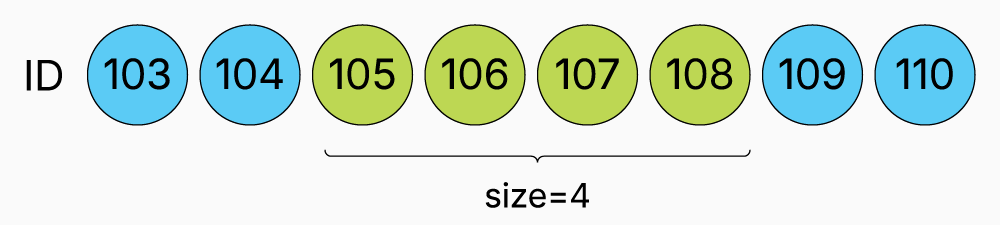
SELECT p."Id", p."Name", p."Description", p."Price"
FROM "Products" AS p
WHERE p."Id" > 9000
LIMIT 10
Keyset pagination is ideal in scenarios where users navigate forward through a feed.
Great example is infinite scrolling, however, despite its advantages keyset pagination isn’t a silver bullet. One of its main limitations is the lack of random access.
Users can’t jump to an arbitrary page because pagination is based on values from the previous page, not page numbers.
Another challenge arises when sorting by columns that aren’t unique. If you sort only by something like Name, and multiple records have the same value, it becomes hard to know where you left off.
You can mitigate this by including a secondary sort column, but it still adds complexity.
Keyset Pagination With Ef Core
You can implement keyset pagination in EF Core easily using the Where and Take methods:
var result = await _context.Products
    .Where(p => p.Id > Reference)
    .Select(p => new ProductResponse(p.Id, p.Name, p.Price))
    .Take(ItemsPerPage)
.ToListAsync();- Where(p => p.Id > Reference) – This filters the products to only include those with an Id greater than a specific Reference value.
- Take(ItemsPerPage) – Retrieves the required number of records.
I prefer to create a generic PagedResponse class, which can be helpful if you need to include additional metadata:
public sealed record KeysetPagedList<TKey, TItem>(
    TKey NextReference,
IEnumerable<TItem> Items);- NextReference – This holds the value you’ll use for the next page request.
- Items - The actual paginated results.
Keyset vs Offset Pagination
As you've probably noticed, keyset and offset pagination, while both used for pagination, serve different use cases depending on the scenario.
Since we previously mentioned that keyset pagination is much faster, I decided to run a benchmark to compare them side by side:
[Benchmark(Baseline = true)]
public async Task<OffsetPagedList<ProductResponse>> OffsetPagination()
{
    var queryable = _context.Products
        .Select(p => new ProductResponse(
            p.Id,
            p.Name,
            p.Price));

    var result = await queryable
        .Skip((PageNumber - 1) * ItemsPerPage)
        .Take(ItemsPerPage)
        .ToListAsync();

    var count = await queryable.CountAsync();

    var response = new OffsetPagedList<ProductResponse>(
        result,
        count);

    return response;
}

[Benchmark]
public async Task<KeysetPagedList<int, ProductResponse>> KeysetPagination()
{
    var result = await _context.Products
        .Where(p => p.Id > Reference)
        .Select(p => new ProductResponse(p.Id, p.Name, p.Price))
        .Take(ItemsPerPage)
        .ToListAsync();

    var response = new KeysetPagedList<int, ProductResponse>(result[^1].Id, result);

    return response;
}| Method | Mean | Error | Ratio | Allocated | Alloc Ratio |
|------------------|------------|-----------|---------------|-----------|--------------|
| OffsetPagination | 4,362.9 us | 26.84 us | baseline | 16.83 KB | |
| KeysetPagination | 606.1 us | 11.34 us | 7.20x faster | 12.88 KB | 1.31x less |From the results, we can clearly see that keyset pagination is much faster.
Conclusion
Keyset pagination is a fast and efficient way to paginate large datasets by using a stable, indexed column as a reference point.
While it sacrifices the ability to jump to arbitrary pages, it significantly improves performance and consistency, especially for real-time or infinite-scroll applications.
If you want to check out examples I created, you can find the source code here:
Source CodeI hope you enjoyed it, subscribe and get a notification when a new blog is up!