
Almost every modern application eventually needs some form of background processing.
Whether it's sending emails, processing files, running recurring jobs or executing delayed workflows, having a reliable scheduling library is essential.
For years, libraries like Hangfire and Quartz.NET dominated the .NET scheduling space, but a newer library called TickerQ is rapidly gaining attention and for a very good reason.
TickerQ
TickerQ is a modern open-source scheduling library built for .NET applications.
Some of the most interesting features include:
- Zero reflection architecture
- True async execution
- EF Core persistence
- Dashboard management
TickerQ has been growing rapidly and is already gaining strong traction within the .NET community thanks to its modern architecture, performance and developer experience.
Getting Started
To get started with TickerQ, you'll first need to install the necessary NuGet packages. You can do this via the NuGet Package Manager or by running the following command in the Package Manager Console:
dotnet add package TickerQOnce the packages are installed, the next step is registering TickerQ inside your application:
var builder = WebApplication.CreateBuilder(args);

builder.Services.AddTickerQ();

var app = builder.Build();
app.UseTickerQ();
app.Run();
AddTickerQ registers all required TickerQ services, while UseTickerQ enables the middleware responsible for processing scheduled jobs and incoming ticker requests.
Basic use cases
TickerQ supports two main scheduling models:
- Time-based scheduling
- Cron-based scheduling
Jobs are simply methods decorated with attributes, making them easy to organize and maintain within your application.
TickerQ automatically tracks next and previous executions, scheduling metadata and more. Recurring jobs can also be configured directly from the dashboard.
Dependency injection is also supported out of the box, allowing jobs to use your existing application services without additional configuration.
Time-based Scheduling
Time-based scheduling is useful when you want a job to execute once at a specific time.
Here's a simple example of a scheduled job:
public class WithRequestJobExample
{
    [TickerFunction("WithBodyJob")]
    public void Run(TickerFunctionContext<RequestExample> context)
    {
        Console.WriteLine($"{nameof(WithRequestJobExample)} executed.");
    }
}
Cron-based Scheduling
Recurring jobs are handled through cron expressions.
public class CronJobExample
{
    [TickerFunction("CronJob", cronExpression: "0/1 * * * *")]
    public void Run()
    {
        Console.WriteLine($"Cron Job {DateTime.UtcNow}");
    }
}
Scheduling Jobs Programmatically
TickerQ also provides full programmatic control over scheduling.
You can schedule jobs programmatically using ITimeTickerManager:
app.MapPost("/time-ticker", async (RequestExample request, ITimeTickerManager<TimeTicker> timeTickerManager) =>
{
    await timeTickerManager.AddAsync(new TimeTicker
    {
        Request = TickerHelper.CreateTickerRequest(request),
        ExecutionTime = DateTime.UtcNow.AddSeconds(10),
        Function = nameof(WithRequestJobExample.Run),
        Retries = 3,
        RetryIntervals = [1,2,3]
    });

    return Results.NoContent();
});
You can configure retry policies, define execution times, pass request payloads and customize scheduling behavior directly from code.
TickerQ serializes and persists the payload automatically.
TickerQ Dashboard
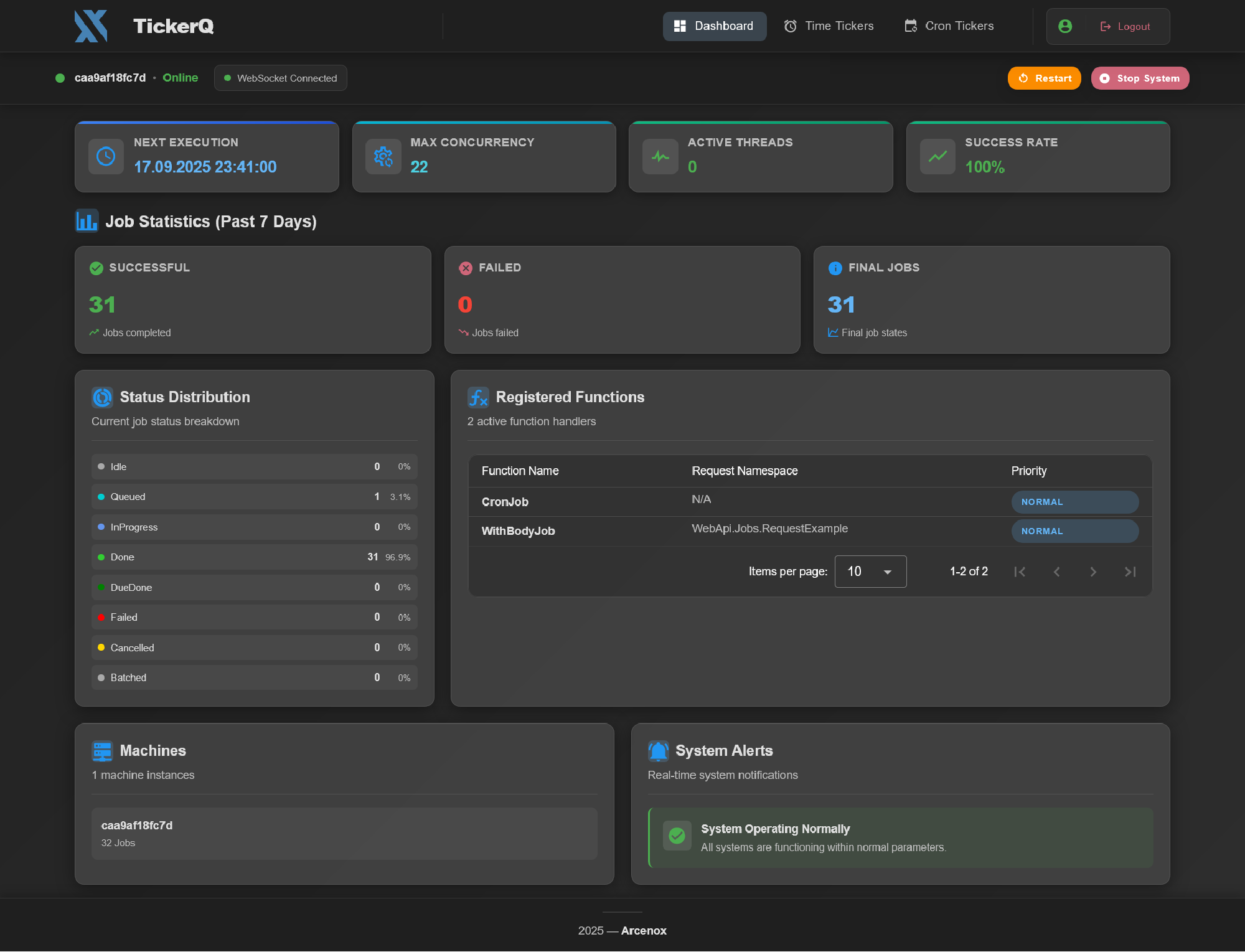
One of the best features of TickerQ is the built-in dashboard.
To enable the dashboard, install the additional dashboard package:
dotnet add package TickerQ.DashboardAdd the dashboard to your TickerQ configuration:
builder.Services.AddTickerQ(tickerOptionsBuilder =>
    tickerOptionsBuilder.AddDashboard(configureDashboard =>
        configureDashboard.BasePath = "/ticker"));
The dashboard allows you to:
- Monitor jobs
- Trigger jobs manually
- Schedule new jobs
- Track failures
- Analyze execution history
Authentication can also be configured easily:
"TickerQ": {
  "BasicAuth": {
    "Username": "admin",
    "Password": "admin"
  }
}
The dashboard provides a clean and modern user interface for monitoring and managing scheduled jobs:
EF Core Integration
TickerQ integrates directly with EF Core for persistence.
This is especially useful when jobs must survive application restarts, deployments or infrastructure failures while still remaining fully traceable.
For this, you’ll also need to add an additional package:
dotnet add package TickerQ.EntityFrameworkCoreUpdate your TickerQ configuration:
builder.Services.AddTickerQ(tickerOptionsBuilder =>
    tickerOptionsBuilder.AddOperationalStore<ApplicationDbContext>(efCoreOptionBuilder =>
    {
        efCoreOptionBuilder.UseModelCustomizerForMigrations();
        efCoreOptionBuilder.CancelMissedTickersOnAppStart();
    }).AddDashboard(configureDashboard => configureDashboard.BasePath = "/ticker"));
Create migration:
Add-Migration InitTickerQ -Context ApplicationDbContextTickerQ will do the rest by creating its own schema and tables automatically.
Comparison
Here's a great comparison I found between Quartz.NET and Hangfire:
| Feature | TickerQ | Hangfire | Quartz.NET |
|---|---|---|---|
| AOT support | Native AOT ready | No | No |
| Discovery | Source generator (compile time) | Reflection (runtime) | Reflection (runtime) |
| Cron jobs | 5/6-part expressions | Cron + recurring | Cron |
| Job chaining | Built-in (parent/child) | Continuations | Listeners |
| Dashboard | Built-in (Vue.js + SignalR) | Built-in | None (third-party) |
| Persistence | EF Core, Redis, in-memory | SQL Server, Redis | ADO.NET |
| Open source | Yes | Partial (Pro features) | Yes |
Conclusion
TickerQ is one of the most promising new libraries in the .NET ecosystem.
It is a modern, high-performance scheduling library focused on simplicity, scalability and developer experience.
Features like native async execution, EF Core integration, zero-reflection architecture and the built-in dashboard add up to a well-rounded scheduling story.
While Hangfire and Quartz.NET are still excellent tools, TickerQ feels like a scheduling library designed specifically for modern .NET applications.
Check out TickerQ on GitHub and if you like it, give it a star:
If you'd like to see a deeper dive into advanced TickerQ features, let me know and I can create a follow-up article covering more advanced scenarios.
If you want to check out examples I created, you can find the source code here:
Source CodeI hope you enjoyed it, subscribe and get a notification when a new blog is up!