
Entity Framework Core handles most data type conversions automatically, however, there are times when your entity properties don’t map directly to database column types.
For example, you might want to:
- Store an enum as a string instead of an integer.
- Wrap primitive keys in value objects to add additional level of type-safety.
- Preserve DateTime.Kind.
This is where EF Core pulls out one of its handy tricks, Value Converters.
Value Converters
A Value Converter in EF Core is a component that transforms property values when reading from or writing to the database.
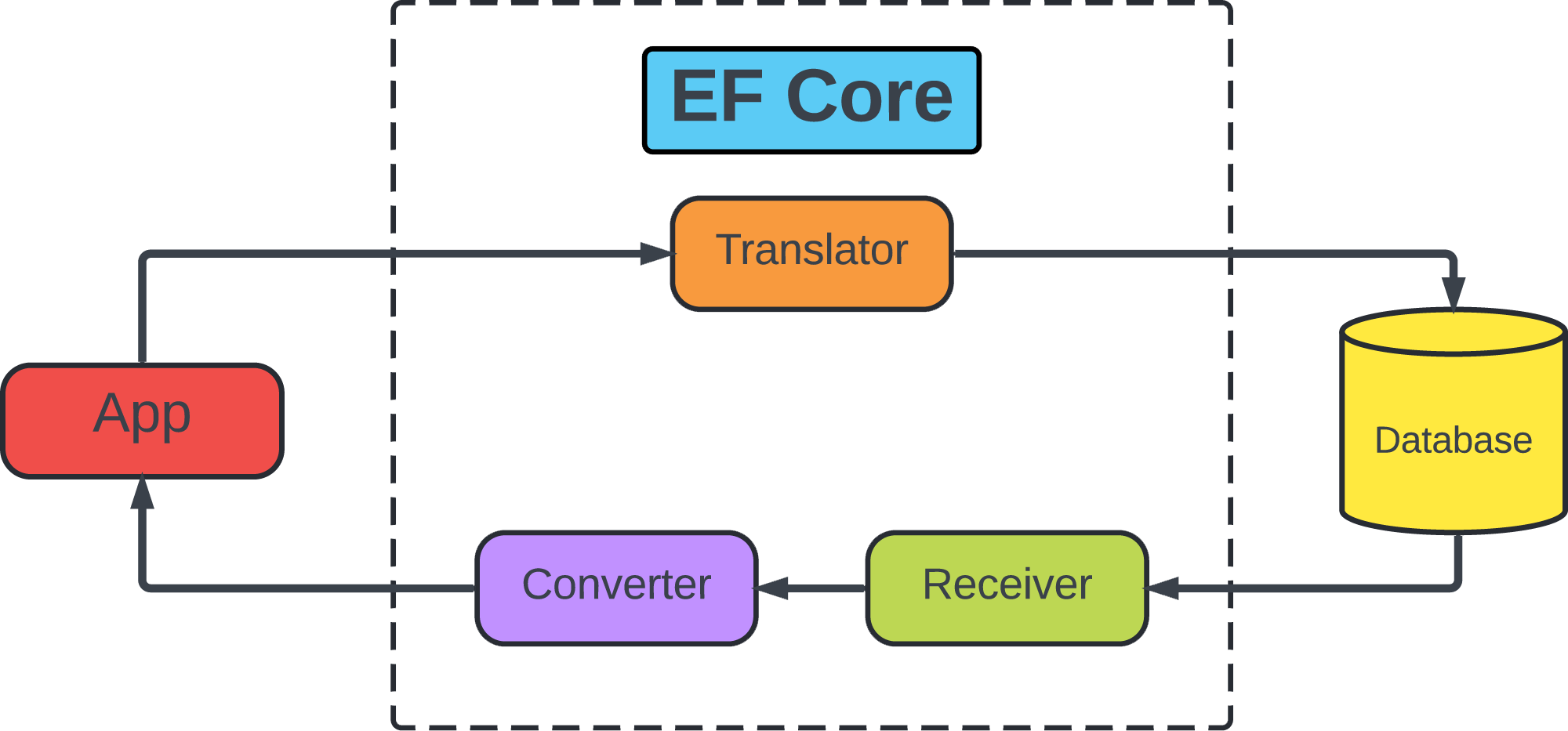
This conversion can be from one value to another of the same type, for example encrypting strings or from a value of one type to a value of another type (enum to strings in database).
Value converters are specified in terms of a ModelClrType and a ProviderClrType. The model type is the .NET type of the property in the entity type. The provider type is the .NET type understood by the database provider.
Conversions are defined using two Func expression trees: one from ModelClrType to ProviderClrType and the other from ProviderClrType to ModelClrType.
This mechanism makes your entities more expressive while keeping persistence concerns separate.
Configuring a Value Converter
To get started, let’s set up a simple example and see how to configure a value converter:
public sealed class Order
{
    public Guid Id { get; set; }
    public OrderStatus Status { get; set; }
}

public enum OrderStatus
{
    Submitted,
    Sent,
    Shipped,
    Canceled
}
Here we have an Order entity with a Status property of type OrderStatus. By default, EF Core will store enum values as integers in the database.
Let’s say we’d prefer to store them as readable strings like "Submitted", "Canceled", etc.
With this setup, EF Core will convert the enum to its string representation when saving to the database, and then parse it back to the correct enum value when reading it:
protected override void OnModelCreating(ModelBuilder modelBuilder)
{
    modelBuilder
        .Entity<Order>()
        .Property(e => e.Status)
        .HasConversion(
            v => v.ToString(),
            v => (OrderStatus)Enum.Parse(typeof(OrderStatus), v));
}
Value converters like this can be configured inside OnModelCreating, and all we need to do is provide two expressions:
- To Provider Expression: how to convert from the .NET type to the database type.
- From Provider Expression: how to convert from the database type back to the .NET type.
Built-in Support
Luckily for us, EF Core has good support for conversion out of the box.
Pre-defined Conversions
Instead of us writing conversion functions manually, EF Core can pick the coversion based on the property type in the model and the requested database provider type.
For example, our example with enums EF Core actually can handle automatically when the provider type is configured as string using the generic type of HasConversion:
protected override void OnModelCreating(ModelBuilder modelBuilder)
{
    modelBuilder
        .Entity<Order>()
        .Property(e => e.Status)
        .HasConversion<string>();
}
Additionally, EF Core can also automatically handle this case by explicitly specifying the database column type:
protected override void OnModelCreating(ModelBuilder modelBuilder)
{
    modelBuilder
        .Entity<Order>()
        .Property(e => e.Status)
        .HasColumnType("nvarchar(20)");
}
Built-in Converters
EF Core also has a set of pre-defined ValueConverter classes:
protected override void OnModelCreating(ModelBuilder modelBuilder)
{
    var converter = new EnumToStringConverter<OrderStatus>();

    modelBuilder
        .Entity<Order>()
        .Property(e => e.Status)
        .HasConversion(converter);
}
In this example we created an instance of the built-in EnumToStringConverter<TEnum> to convert enum to string.
There are also a lot more built-in converters for enums, Guids, strings, IPAddresses and more.
NOTE: All built-in converters are stateless and a single instance can be safely shared by multiple properties.
Custom Converters
When built-ins aren’t enough, you can create a custom converter using ValueConverter<TModel, TProvider>.
For example, let's say we want strongly typed Ids:
public sealed record OrderId(Guid Value);

public sealed class Order
{
    public OrderId Id { get; set; }
    public OrderStatus Status { get; set; }
}
To create a custom converter is simple, it looks like this:
var stronglyTypedIdConverter = new ValueConverter<OrderId, Guid>(
    id => id.Value,
    value => new OrderId(value)
);

modelBuilder.Entity<Order>()
    .Property(o => o.Id)
    .HasConversion(stronglyTypedIdConverter);
This ensures your domain stays strongly typed while the database stores a simple Guid.
Additionally, what you could do, in order to not repeat converters everywhere, you can also create a reusable generic converter:
public interface IStronglyTypedId
{
    Guid Value { get; }
}

public readonly record struct OrderId(Guid Value) : IStronglyTypedId;
public readonly record struct ProductId(Guid Value) : IStronglyTypedId;public class StronglyTypedIdConverter<TStronglyTypedId>
: ValueConverter<TStronglyTypedId, Guid> where TStronglyTypedId : struct, IStronglyTypedId
{
public StronglyTypedIdConverter()
: base(
id => id.Value,
value => (TStronglyTypedId)Activator.CreateInstance(typeof(TStronglyTypedId), value)!)
{ }
}Now, we can define sa many strongly typed Ids as we want while conversion logic lives in one place, reusable across our entire domain:
modelBuilder.Entity<User>()
    .Property(u => u.Id)
    .HasConversion(new StronglyTypedIdConverter<UserId>());

modelBuilder.Entity<Order>()
    .Property(o => o.Id)
    .HasConversion(new StronglyTypedIdConverter<OrderId>());
Known Limitations
Before you jump in and start utilizing value conversions there are few known limitations that you should be aware of:
- Null cannot be converted.
- You cannot spread a conversion of one property to multiple columns and vice-versa.
- Parameters using value-converted types cannot currently be used in raw SQL APIs.
Conclusion
Value Converters in EF Core give you the flexibility to bridge the gap between your domain model and the database schema without compromising either.
And while EF Core already provides a great set of built-in converters for common cases, custom converters give you complete control for domain-specific needs.
Just keep in mind their few limitations, especially around nulls, multi-column mappings and raw SQL parameters.
If you want to check out examples I created, you can find the source code here:
Source CodeI hope you enjoyed it, subscribe and get a notification when a new blog is up!